44 filesystems
Filesystem & deleted-file recovery
Walks raw metadata of 44 filesystems to rebuild full directory paths — from the journal, orphan inodes, directory slack, MFT slack and FAT1/FAT2 differencing. Not just "scan free space".
GHOST RECOVER is an all-in-one Linux data recovery engine: it walks the raw metadata of 44 filesystems, carves 315 file formats by signature, reassembles broken RAID arrays, clones failing drives and repairs damaged disks — with a web interface, a CLI and an HTTP API.
filesystems identified
20 families fully walked
carver signatures
14 categories, one AC pass
automated checks
0 failures, MD5-verified
minimum RAM
RAM-aware thread pools
one engine, every technique
Most tools do one trick. GHOST RECOVER combines the metadata walk, the byte-level carve and the geometry rebuild — three complementary passes so nothing is missed.
Walks raw metadata of 44 filesystems to rebuild full directory paths — from the journal, orphan inodes, directory slack, MFT slack and FAT1/FAT2 differencing. Not just "scan free space".
315 formats across 14 categories matched in a single Aho-Corasick sweep, with structural length validation, entropy screening and content-hash dedup. Works with no filesystem at all.
Reads md superblocks 0.90 and 1.x, or derives chunk size, member order and parity layout blind — then rebuilds a missing member from parity. Linear, RAID 0/1/5/6/10.
ddrescue-style cloning with a resumable map file, large reads on the good pass and sector-by-sector retries over bad areas. Image the dying drive first, recover from the clone.
Restores ext superblocks, FAT/exFAT boot regions, NTFS boot sectors and GPT headers from backups, and rebuilds an MBR from recovered partitions. Dry run until you say apply.
Candidate limits, caches and thread pools scale with installed memory. Jobs run one at a time in a fair queue and the progress bar reports honest byte- and candidate-based percentages.
see it working
Run ./ghost_recover and a browser opens on 127.0.0.1:3030. Long operations return a job id and are polled with a live progress bar. Images, audio and video play in place, PDFs render in an iframe and unknown formats fall back to a hex viewer.
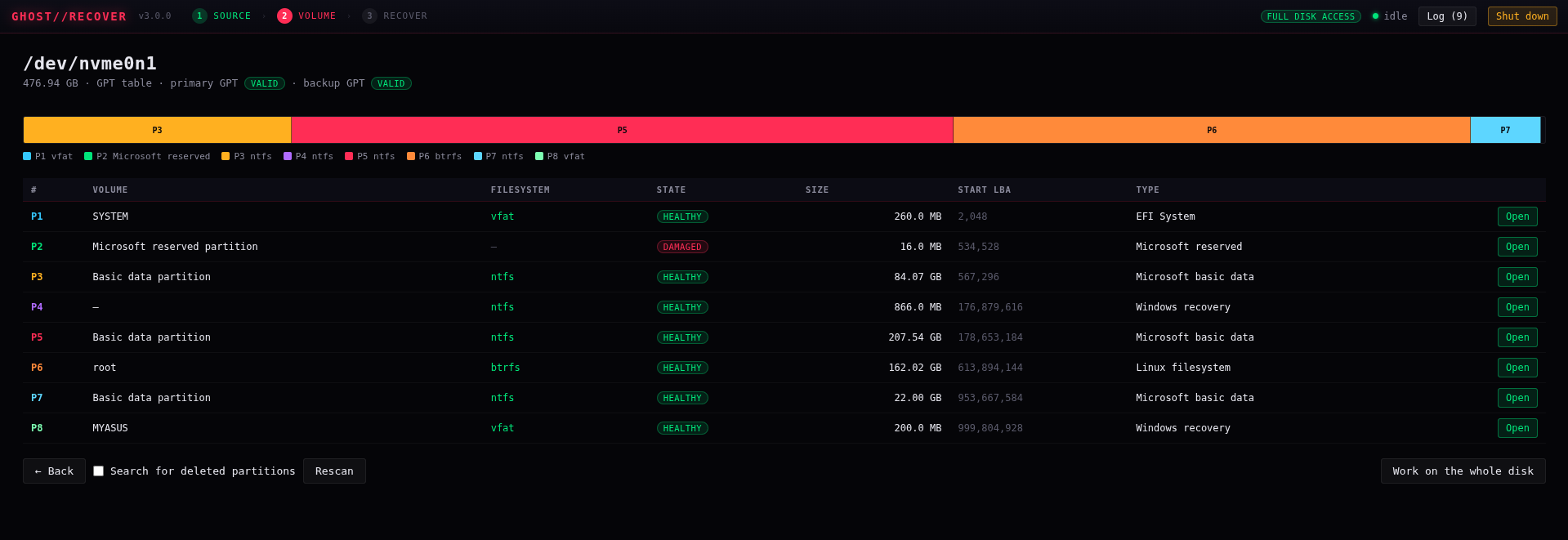
Browse recovered files, filter by type, preview photos and video in the browser.
The UI is a thin client over the same API. Files stream window-by-window and answer HTTP Range requests natively, so a player can seek through a multi-gigabyte carve without loading it. max= bounds a preview's byte budget (the response carries X-Content-Truncated: 1), while downloads always get the complete file.
/api/file only serves paths under the output root — the engine will not read arbitrary files off the host.
GET  /api/health /api/disks /api/filesystems /api/carvers /api/browse
GET  /api/privileges   POST /api/elevate   GET /api/elevate/status
POST /api/handover (privilege hand-off)    POST /api/shutdown
POST /api/detect /api/partitions
POST /api/scan /api/carve /api/deep /api/extract /api/image   -> { job }
GET  /api/job?id=  /api/jobs           POST /api/job/cancel
GET  /api/results?job=&offset=&limit=&q=&ext=&only=&sort=
GET  /api/content?job=&index=[&max=]   /api/hex  /api/fileinfo  /api/file
POST /api/raid/detect /api/raid/assemble /api/repair /api/save
44 filesystems · 20 walked families
Every driver reconstructs full directory paths and describes files as extent lists — so fragmented files come out intact, not corrupted.
Linux
Windows
Apple
Optical
Embedded
ZFS is parsed at the vdev-label / uberblock level. File-level recovery would need a full DMU traversal, so the engine says so instead of pretending — and points you at zpool import -o readonly=on or signature carving as the working alternatives.
recover deleted files
315 signatures · 14 categories
One Aho-Corasick pass over the device instead of one search per signature. Formats that describe their own length are walked structurally, so files come out at their true size instead of a fixed guess. Results are entropy-screened, deduplicated by content hash, and can be restricted to free space.
Images
JPEG · PNG · GIF · TIFF · BMP · WebP · HEIC · JXL · FLIF · BPG · PNM · SGI · XPM · PICT · ICO
Camera RAW
CR2 · CRW · NEF · ARW · ORF · RAF · DNG · MRW · PEF · RW2
Video
MP4 / ISO-BMFF · MKV / EBML · AVI / RIFF · MOV · FLV · ASF/WMV · MPEG PS/TS · NSV · WTV
Audio
MP3 · AAC · AC-3 · FLAC · Ogg · WAV · TTA · OFR · VQF · RA
Documents
PDF · OLE2 (DOC/XLS/PPT) · OOXML · ODF · RTF · DVI · FDF · QXP
Archives
ZIP · 7z · RAR · tar · ar · CAB · XAR · ARJ · ARC · ZOO · SQX · KGB · ZPAQ · RZIP · UHARC · ALZ · PAK · WAD
Databases
SQLite · dBase family · ESEDB · registry hives · QED
Executables
ELF · PE · Mach-O · WASM · DEX · Android boot
Forensic images
EWF (E01) · AFF · minidump (DMP)
Network
pcap · pcapng
Logs & artifacts
EVTX · REG · PCF
Crypto & keys
GPG keyrings · certificates
3D & fonts
PLY · LWO2 · ILBM · TTF/OTF/WOFF
Retro & misc
NES · IFF/FORM · CRW · misc containers
The registry grew from 263 to 315 signatures and was refactored from 14 category files into 175 per-format translation units — with 31 new structural walkers (ARJ, ARC, PAK, WAD, QED, Android boot, EWF, minidump, PNM, SGI, XPM, CRW, NSV, WTV, NES, dBase and more) and matching fixtures. Registry output stayed byte-identical.
the details nobody advertises
Recovery software is judged on the edge cases. These are the ones GHOST RECOVER already handles.
Pick a locked disk and the interface launches a privileged copy of itself and hands over the port — the browser reconnects to the same page with full disk access. It prefers pkexec so your password never passes through the program; sudo is a one-time fallback, never stored.
GHOST RECOVER will not write recovered data back onto the disk it came from — for recovery, carving or imaging. Not a warning: an outright refusal. Everything is read-only unless you start it with --allow-writes.
Frame walkers resync over a bounded 32 KiB window instead of ending at the first overwritten frame, so a partly-overwritten track carves as a single playable file instead of one file per frame run.
A chunk size of N and N/2 map the start of an array identically. On a near-empty array the engine reports the alternatives with low confidence rather than presenting a guess as a finding. Same for ZFS: it names the limit instead of pretending.
1 MiB of random noise used to carve ~29 bogus JXL/GPG files. With the new validators: at most one. Weak 1-byte magics get a scan-time admission filter so the candidate cap stays meaningful on dense media.
Files stream window-by-window and answer HTTP Range natively, so players seek through multi-gigabyte carves without loading them. Video previews stream behind a 256 MiB cap, and /api/file only serves paths under the output root.
how it works
Reads the live and deleted structures of the filesystem to rebuild the directory tree exactly as it was.
A byte-level sweep that finds files by content — works even when the filesystem is gone, formatted over or corrupted.
Finds lost partitions and works out RAID geometry when the metadata is destroyed.
interfaces
Web UI
127.0.0.1:3030
CLI
./ghost_recover
HTTP API
/api/*
engine core
Job orchestrator
async jobs + live progress
Streaming window
1 GiB RAM budget
recovery passes
Filesystem walk
44 filesystems
Signature carving
315 carvers
Partition & RAID
geometry rebuild
device layer
Read-only access
no writes to source
Imaging & output root
sparse images, logs
include/ghost/types, I/O, JSON, filesystem, carving, disk, recovery, server headerssrc/core/windowed and cached DiskReader, JSON, hashing, job managersrc/fs/detection and one file per filesystem familysrc/carve/Aho-Corasick matcher, signature registry, carving enginesrc/disk/device enumeration, partition tables, RAIDsrc/recover/extraction, repair, imagingsrc/server.cppHTTP APIweb/interface (index.html, app.js, styles.css)tests/fixture builder and end-to-end verificationworking safely
Writing recovered files onto the disk you are recovering from overwrites the free space still holding the rest of your data. The engine refuses this outright — for recovery, carving and imaging — rather than warning about it.
If a drive is making noises or throwing I/O errors, run ghost_recover image and recover from the clone. Bad-sector retries and a resumable map file mean you can stop and continue.
Every repair is a dry run unless you pass apply, and the original sectors are saved first. Nothing is written anywhere unless you started the engine with --allow-writes.
The suite builds real ext4/ext2/NTFS/FAT32/exFAT/Btrfs/XFS/ISO/UDF/SquashFS/cramfs/MINIX/JFFS2 filesystems from a known corpus — no mounting, no root — deletes files from some of them, then checks that the engine identifies each filesystem, finds the deleted files, and writes every recovered file back out byte-for-byte identical to the original, verified by MD5, not by the engine's own reporting.
The Btrfs fixture rewrites real extents as compressed ones (inline zlib/lzo/zstd, regular zlib extents) and the NTFS fixture stores one file as an LZNT1 stream, so the compressed-content paths are proven against the same corpus. Also covered: MBR logical partitions, partition recovery after wiping both GPT copies, RAID 0/5 geometry recovery from data alone, parity rebuild of a destroyed member, superblock repair (dry run vs apply), bad-sector imaging, the refusal to write onto the source disk, and corrupt / truncated / random images handled without crashing or being misidentified.
Static analysis runs clang-tidy with the bugprone*, clang-analyzer* and misc-const-correctness groups, and the suite also runs under ASan/UBSan — this tool parses hostile on-disk structures for a living, so memory safety is tested, not assumed.
$ ./tests/verify.sh
building fixtures (no mount, no root) ......... ok
ext4 / ext2 / ext3 ........................... pass
NTFS (+ LZNT1 stream) ........................ pass
FAT32 / exFAT / VFAT ......................... pass
Btrfs (zlib · lzo · zstd · inline) ........... pass
XFS / MINIX / cramfs / JFFS2 ................. pass
ISO 9660 / UDF ............................... pass
partition recovery (both GPT copies wiped) ... pass
RAID 0/5 geometry from data alone ............ pass
parity rebuild of destroyed member ........... pass
refuses to write onto source disk ............ pass
md5 byte-for-byte on every recovered file .... pass
88 checks · 0 failures
quick start
Needs a C++17 compiler and CMake ≥ 3.16. zlib is optional (SquashFS/cramfs/JFFS2 decompression); zstd is too (Btrfs zstd extents). Recovered files go to $GHOST_OUTPUT, or ~/ghost-recover-output.
git clone https://github.com/nkbeast/ghost-recovercd ghost-recovercmake -S . -B build -DCMAKE_BUILD_TYPE=Releasecmake --build build -j./build/ghost_recover # opens the web interface
sudo ghost_recover parts /dev/sda --deepsudo ghost_recover scan /dev/sda2 --deletedsudo ghost_recover recover /dev/sda2 --out ~/rescuedsudo ghost_recover carve /dev/sda2 --out ~/carved --categories image,documentsudo ghost_recover image /dev/sdb --out ~/sdb.imgghost_recover raid m0.img m1.img m2.img --out ~/array.img
sudo ghost_recover parts /dev/sda --deeppartitions, incl. deleted ones
sudo ghost_recover scan /dev/sda2 --deletedlist deleted files
sudo ghost_recover recover /dev/sda2 --out ~/rescuedextract with full paths
sudo ghost_recover carve /dev/sda2 --out ~/carved --categories image,documentsignature carving
sudo ghost_recover image /dev/sdb --out ~/sdb.imgclone a failing drive
ghost_recover raid m0.img m1.img m2.img --out ~/array.imgreassemble an array
Reading a physical disk needs root. Pick a locked disk and the interface offers to unlock it: it launches a privileged copy of itself and hands over the port, so the browser reconnects to the same page with full disk access. It prefers pkexec — your desktop's own authentication dialog, so the password never passes through this program — and where polkit is unavailable it falls back to a sudo password, used once and never stored.
faq
Deleted files, formatted partitions, lost photos/videos/documents from RAW-scanned disks, RAID arrays whose metadata is gone, and files off failing drives you first clone to an image.
roadmap
Contributions toward any of these are very welcome. CI builds and runs the full verification suite on every pull request.

Free and open source, MIT licensed. No accounts, no trials, no telemetry. Star the repo, build it in four commands, and keep it on the rescue USB you hope you never need.